I Built My Entire Portfolio with Claude Code.
Here's What Happened.
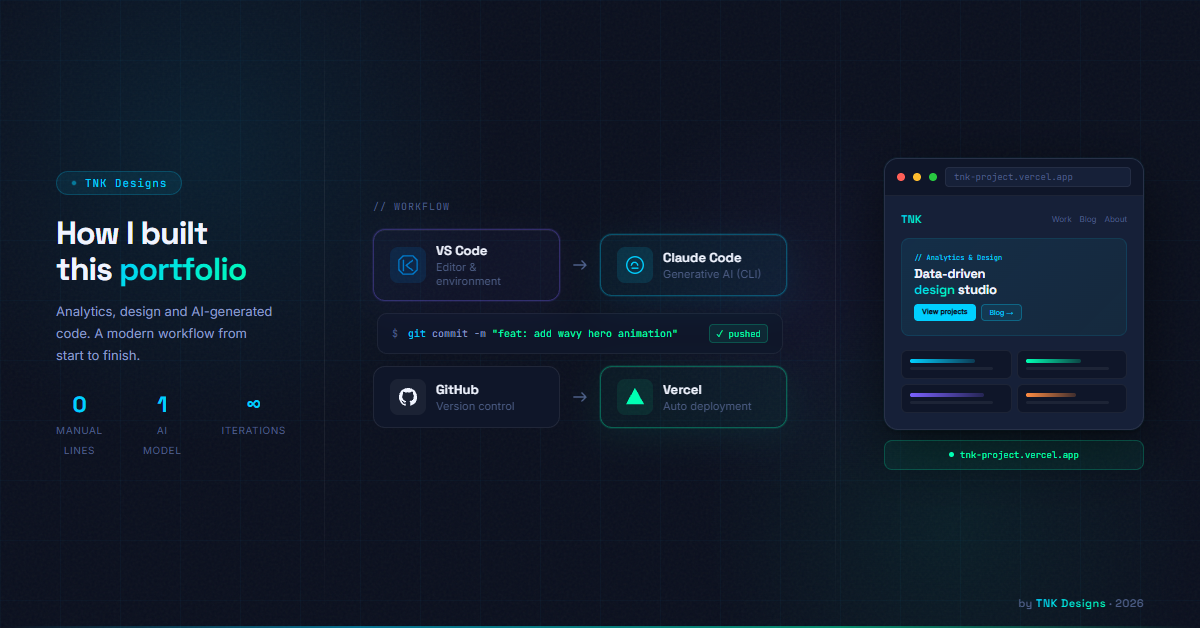
No boilerplate. No templates. No hand-coding. Just a terminal, a clear brief, and an AI agent that built everything you're looking at right now — from scratch.
✓ blog.html created
✓ projects.html created
✓ contact.html created
✓ 5 project detail pages
✓ 4 blog article pages
→ All navigation linked. All assets wired. Fully functional.
The starting point
I needed a personal site. Portfolio, blog, contact form — the usual. The kind of thing that would normally take a weekend of fighting with CSS frameworks, fiddling with component libraries, and wrestling with deployment configs.
Instead, I opened a terminal and typed claude.
What followed was one of the most interesting creative processes I've been through. Not because the AI did everything automatically — but because of how the collaboration worked. I directed. Claude built. I reviewed, corrected, and refined. It felt less like using a tool and more like working with a very capable developer who never needed sleep.
How it was built
The build happened across multiple conversations, each focused on a specific piece of the site. Here's roughly the sequence:
Session 1
Full scaffold + home page
Navbar, hero section, about, experience timeline, featured projects, skills bars, blog preview, contact CTA, footer. All in one shot from a detailed brief.
Session 2
All missing pages
Blog listing, project listing, blog article pages, project detail pages, contact page — including internal navigation between all of them.
Session 3+
Real content + refinements
Swapping placeholders for real assets: actual logo PNG, real portrait photo, real job history with company logos, real project descriptions, and this very blog post.
What Claude Code actually does
If you haven't used it: Claude Code is Anthropic's CLI tool that runs in your terminal and has direct access to your filesystem. It can read files, write files, search the codebase, run commands, and maintain context across a session.
The key difference from a chat interface is agency. You don't copy-paste code snippets back and forth. You describe what you want, and Claude reads the existing files, decides what to change, and makes the edits directly. It's the difference between a consultant who emails you a document and one who sits next to you and works in your codebase.
The mental model that worked for me: treat Claude Code like a senior developer joining your project. Give it context, give it constraints, give it real content — and get out of the way.
What it got right immediately
- Design consistency. I gave the design system upfront (colors, fonts, spacing tokens) and it held to them religiously across every page and every session. No color drift, no font inconsistencies.
- Component reuse. The navbar, footer, and card patterns are identical across all pages — built once and replicated with precision.
- Responsive behavior. Every page handles mobile, tablet, and desktop. It added JavaScript grid-switching automatically, without being asked, because it knew that was appropriate for a static HTML site.
- Real content integration. When I said "use the photo from the ME folder" or "use logos from LOGOS", it found the files, used the right relative paths, and handled edge cases like
object-position: center topto keep the face in frame.
The moments that surprised me
A few things stood out that I didn't expect from an AI building frontend:
It read the brief and inferred intent. When I described the experience section, it didn't just list jobs — it added a "Current" badge with an animated dot for the active role, made older roles visually dimmer, and used white-background tiles for the logos so they'd render cleanly on a dark background. None of that was in my instructions.
It maintained project memory. Across different sessions, it remembered the design system, the file structure, and the established patterns. It didn't ask me to repeat myself.
It handled the meta. When I asked it to write a blog post about building the site with Claude Code... it wrote this.
What required iteration
Not everything was one-shot. A few things needed back-and-forth:
- Internal navigation. The first version had
href="#"placeholders throughout. I had to explicitly ask it to wire up all the links to real pages — which it then did comprehensively across every file. - Content accuracy. Placeholder content (fake job titles, invented companies) needed replacing with real information. That's on me — you get out what you put in. The more real context I gave, the better the output.
- Deletions. Removing entire sections (like the A/B Testing project) required explicit instruction. It doesn't self-edit without direction.
What this means for how I work
I'm a Digital Analytics Engineer. My day job is implementing tracking, building measurement frameworks, and making data useful. I'm not a frontend developer. And yet, I now have a custom-built portfolio site with a consistent design system, multiple pages, real content, and no technical debt.
That's the actual story here. Not "AI replaces developers" — it doesn't, and this site isn't a production Next.js app with a CMS and auth. But for someone who knows what they want and can communicate it clearly, Claude Code dramatically lowers the barrier between idea and working product.
The skill that mattered most wasn't coding. It was brief-writing. Being precise about what I wanted. Knowing when to push back on an output. Understanding the structure well enough to review the work.
The future of building things isn't no-code. It's better-briefed.
Try it yourself
If you're curious, Claude Code is available as a CLI tool from Anthropic. The workflow is: npm install -g @anthropic-ai/claude-code, then claude in your project directory. Start with a CLAUDE.md file that defines your design system and conventions — it makes a significant difference in output quality.
Everything you're looking at — the design, the content, the structure, the navigation — was built in that terminal. The only things I brought were the brief, the assets, and the judgment to know when it was right.
Shared on LinkedIn
Comments

Guillermo García
Digital Analytics Engineer · TNK
You might also like